 Tab Cabinet
Save every tab in a Chrome window with one click and reopen them later with pinned tabs and tab groups in place. Pro also keeps every save as a Markdown and a JSON file.
Your sessions stay in Chrome on your computer, with no account. The files go to Downloads/TabCabinet/, so you still have a copy if the extension’s data is ever lost.
Chrome Web Store listing: pending review
Free for up to 5 saved sessions. Pro is a one-time payment of $5.

Clear the window now. Pick it up later.
Everything happens in a small popup next to the address bar. The first button saves every tab in the window and closes them.
Reopen tabs the way you left them
Each session keeps every tab’s title and address, which tabs were pinned, and the name and color of each tab group. Press Open all and they come back the same way, or expand a session and open just the tab you need.
- Save and close the tabs, or save and keep them open
- Sessions are named by date and time; rename them anytime
- Delete with undo, and close duplicate tabs in one click
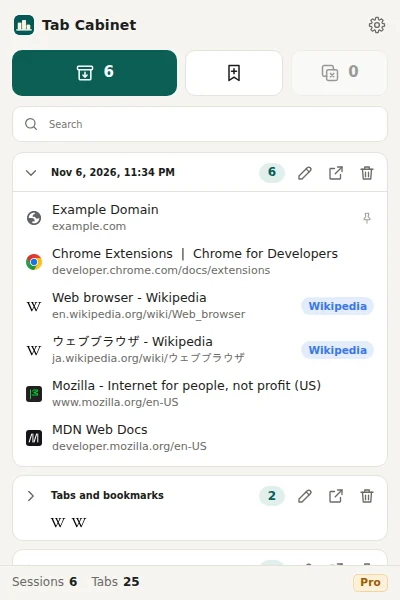
Search every tab you have savedPro
Type part of a title or an address and Tab Cabinet lists the matching tabs from all your sessions. A page saved in several sessions shows up once, labeled with the newest session that has it.
- Searches titles and URLs
- No limit on the number of sessions
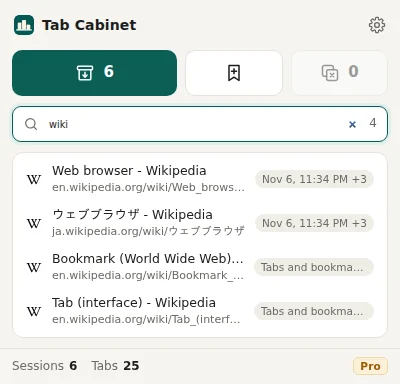
A file on your disk for every savePro
Turn on Files on every save and each save writes two files to Downloads/TabCabinet/: a JSON file that Tab Cabinet can import again, and a Markdown file with one line per tab that any text editor can open. Daily snapshot adds one copy a day of the tabs in all open windows while Chrome is running.
- File names carry the date and time, like
tabcabinet-2026-11-06-233401.md - The files stay in Downloads even if you remove the extension
- Free plan: export and import all sessions as JSON from the options page
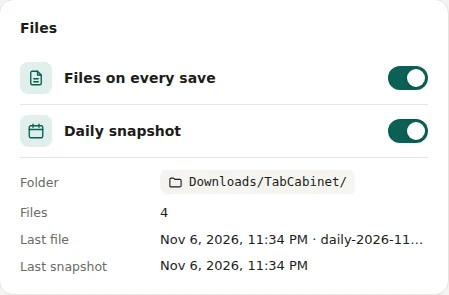

Saved tabs can disappear with an update
Most tab managers keep your sessions only inside the browser. When an update changes how that data is stored, or the browser clears it, there may be nothing left to restore from.
We read the newest and the lowest-rated reviews of five tab managers on the Chrome Web Store, including OneTab, Session Buddy, Toby and Tab Session Manager, in English and Japanese on November 4, 2026. The 70 is a keyword count, not a review-by-review judgment.
Developers often reply that cleanup software or a browser bug caused the loss, not the extension. Session Buddy’s developer has written that “browsers will sometimes clear extension data” and added a backup feature in version 4.1.0. Whatever the cause, a copy outside the browser is what lets you get your tabs back.
Tab Cabinet keeps its sessions inside Chrome too, so the same risk applies to it. That is why Pro writes files: the copies in Downloads/TabCabinet/ do not depend on the extension.
After the July 1, 2026 update, all saved tabs were gone and could not be recovered. There was no warning first.
An update arrived without notice and many tabs were lost. Troubleshooting did not bring them back. (Written in Japanese.)
After the sudden upgrade to version 4, everything saved before was gone, and there was no prompt to export first. (Written in Japanese.)
The extension crashed and lost all saved sessions, the settings and the backups.
An update required logging in, with no way to export first. After registering, the saved items were gone.
How Tab Cabinet compares
Each tool has its own idea of where your tabs should live. This is what their own websites and help pages say.
| Feature | Tab Cabinet | OneTab | Session Buddy | Toby |
|---|---|---|---|---|
| Account needed | No | No. Optional sign-in for encrypted sync and backup | No | Yes. Toby’s help center says it “needs a free account” |
| Where your tabs are kept | In Chrome on your computer. Pro also writes files to Downloads/TabCabinet/ | In the browser’s database on your computer; optional encrypted cloud sync | On your device, “never on any server” | In your Toby account, synced to the browsers and devices you sign in to |
| Copy to a file | Free: JSON export and import. Pro: a JSON and a Markdown file on every save, plus a daily snapshot | Export and import lists of tabs | 15+ formats, including JSON, CSV, Markdown and HTML; backup files and an automatic backup | Export of saved items (format not stated on the pricing page) |
| Price | Free up to 5 sessions. Pro $5 once | Free | Free | Free up to 60 saved tabs. Productivity: $6 per member a month, or $4.50 a month billed yearly |
Checked on November 6, 2026 on one-tab.com, OneTab help, sessionbuddy.com, Toby pricing and Toby help. We did not confirm whether OneTab’s optional sync is paid. Prices change, so check each site before you decide. A longer comparison is in OneTab alternatives.
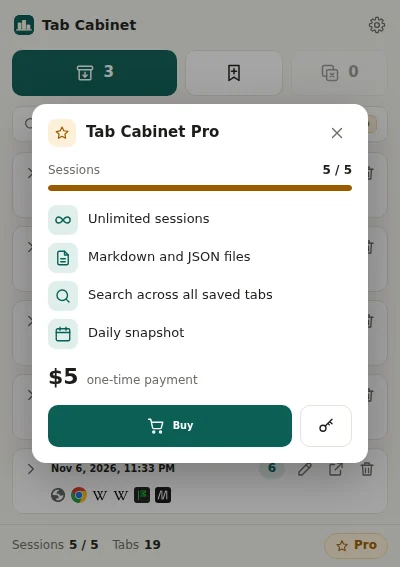
Free for 5 sessions. $5 once for the rest.
No subscription and no account. Pay once and use Pro on up to 3 devices.
Free
- Up to 5 saved sessions
- Save and close all tabs, or save and keep them open
- Reopen with pinned tabs and tab groups
- Open a whole session or a single tab
- Rename, delete with undo, close duplicates
- Export and import all sessions as JSON
Chrome Web Store listing: pending review
Pro One-time
- Everything in Free
- Unlimited sessions
- Search across all saved tabs
- A JSON and a Markdown file in
Downloads/TabCabinet/on every save - A daily snapshot of the tabs in all open windows
- One person, up to 3 devices
Questions
What does Tab Cabinet send over the internet?
Only your license key and activation ID, and only for Pro. They go to Polar Software, Inc., which issues the keys, so the key can be checked. Your tabs, their titles and addresses, and your sessions are never sent anywhere. The free version sends nothing. Details are in the Privacy Policy.
Can I get a refund?
Yes. Within 14 days of purchase you get a full refund, no questions asked. Email support@transaij.com with your Polar order number, and Polar returns the payment to your original payment method. See the refund policy.
How many computers can I use Pro on?
One license is for one person on up to 3 devices. Enter the same key in Chrome on each of them. Sessions are not synced between devices: each Chrome keeps its own sessions.
Is there a Firefox, Safari or mobile version?
No. Tab Cabinet runs in Google Chrome on desktop, version 116 or later. There is no Firefox or Safari version, and Chrome on phones does not run extensions.
Where is my data stored?
In Chrome’s extension storage on your computer (chrome.storage.local in your Chrome profile). Nothing is stored on a server, so there is no account. With Pro, Tab Cabinet also writes files to Downloads/TabCabinet/. Those are ordinary files you can copy, back up or open in any text editor.
If I uninstall Tab Cabinet, are my sessions deleted?
Yes. Chrome deletes an extension’s stored data when you remove it, so the sessions inside Tab Cabinet go too. Files already in Downloads/TabCabinet/ stay. Before you uninstall, press Export on the options page to save every session as a JSON file. You can import it again later.
How do I enter my Pro license key?
Open Tab Cabinet, click the gear icon to open Options, paste the key under License and press Activate. You can also press the key button in the Pro panel that opens from the popup.
Who makes Tab Cabinet?
A small software company in Sapporo, Japan. Its legal name, address and email are at the bottom of every page and in the Terms. Payments for Pro are handled by Polar Software, Inc. as merchant of record. Google does not sell Tab Cabinet.
Try it on the window you have open now
Install Tab Cabinet, press the first button, and every tab in the window is saved.
Chrome Web Store listing: pending review